
Wireless charging has gone from a novelty feature to a genuine everyday convenience. No more digging through a bag for the right cable, no more worn-out charging ports from years of plugging and unplugging — just set your phone down and it charges. In this guide, we’ll cover how wireless charging actually works, what to look for when buying a charger, and how to get the most out of one.
How Does Wireless Charging Work?
Wireless chargers use a technology called Qi (pronounced “chee”), an industry-wide standard supported by essentially every modern smartphone, including iPhones and most Android flagships. A coil inside the charging pad creates a magnetic field that induces a current in a matching coil inside your phone — no metal contacts, no cable, just electromagnetic induction.
The newer Qi2 standard builds on this with magnetic alignment (similar to Apple’s MagSafe), snapping your phone into the exact center of the coil every time for more consistent, efficient charging — no more nudging your phone around a pad trying to find the sweet spot.
Why Choose a Wireless Charger?
Simplicity
Set your phone down, and it starts charging. No cable to find, no port to squint at in the dark.Less Port Wear
Charging ports are one of the first things to wear out on a phone. Wireless charging means fewer plug-in cycles and less strain on that connector over the life of your device.Multi-Device Convenience
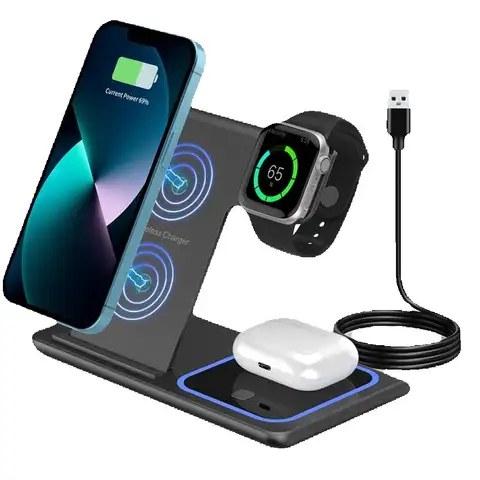
Many wireless chargers and charging stands can power a phone, smartwatch, and earbuds at once, replacing three separate cables with one charging spot.Magnetic Alignment (MagSafe / Qi2)
Magnetic wireless chargers snap into place and hold your phone securely, which also makes them genuinely usable as a stand for calls or video while charging.
How to Choose the Best Wireless Charger
1. Wattage
Wireless chargers are commonly available in 10W, 15W, 20W, and 25W+ output. Higher wattage means faster charging, but your phone also needs to support that speed — check your phone’s supported wireless charging wattage before paying extra for a higher-wattage charger.
2. Form Factor
Flat pads are the simplest and cheapest option. Charging stands prop your phone upright, which is useful for video calls or watching content while it charges. 3-in-1 stands add dedicated spots for a smartwatch and earbuds.
3. Magnetic vs. Standard Qi
Magnetic (MagSafe-style or Qi2) chargers self-align and hold your phone in place — worth it if you’ve ever fumbled trying to find the charging coil on a flat pad. Standard Qi chargers work with any Qi-enabled phone or case, magnetic or not.
4. Case Compatibility
Thick cases, especially ones with metal components (like credit card holders with a metal plate), can interfere with wireless charging. If you use a case, check that it’s wireless-charging-friendly.
5. Extra Ports
Some chargers include a USB-C port for a wired accessory alongside wireless charging, which is handy for topping up earbuds or a second device without needing another outlet.
Wireless Chargers at Corvix
We carry a full range of wireless chargers built around these exact considerations — flat pads for simple everyday charging, magnetic stands for hands-free use, 3-in-1 stations for phone + watch + earbuds, and even wireless car chargers with auto-clamping mounts. Browse our Wireless Charger collection to find the right one for how you actually use your phone.
Getting the Most Out of Your Wireless Charger
Keep the surface clean: Dust or debris between the phone and pad can reduce charging efficiency and generate extra heat.
Remove thick cases if charging seems slow: A bulky case adds distance between the coils, which can noticeably reduce charging speed.
Use a proper power adapter: Wireless chargers need adequate power input to hit their rated wattage — an old, underpowered adapter can quietly bottleneck your charging speed.
Final Thoughts
Wireless charging isn’t just a gimmick anymore — it’s a genuinely more convenient way to keep your phone topped up, whether that’s a single pad on your nightstand or a full charging station that handles your phone, watch, and earbuds together. Figure out how you actually charge your devices day to day, and pick the wireless charger that fits that routine.